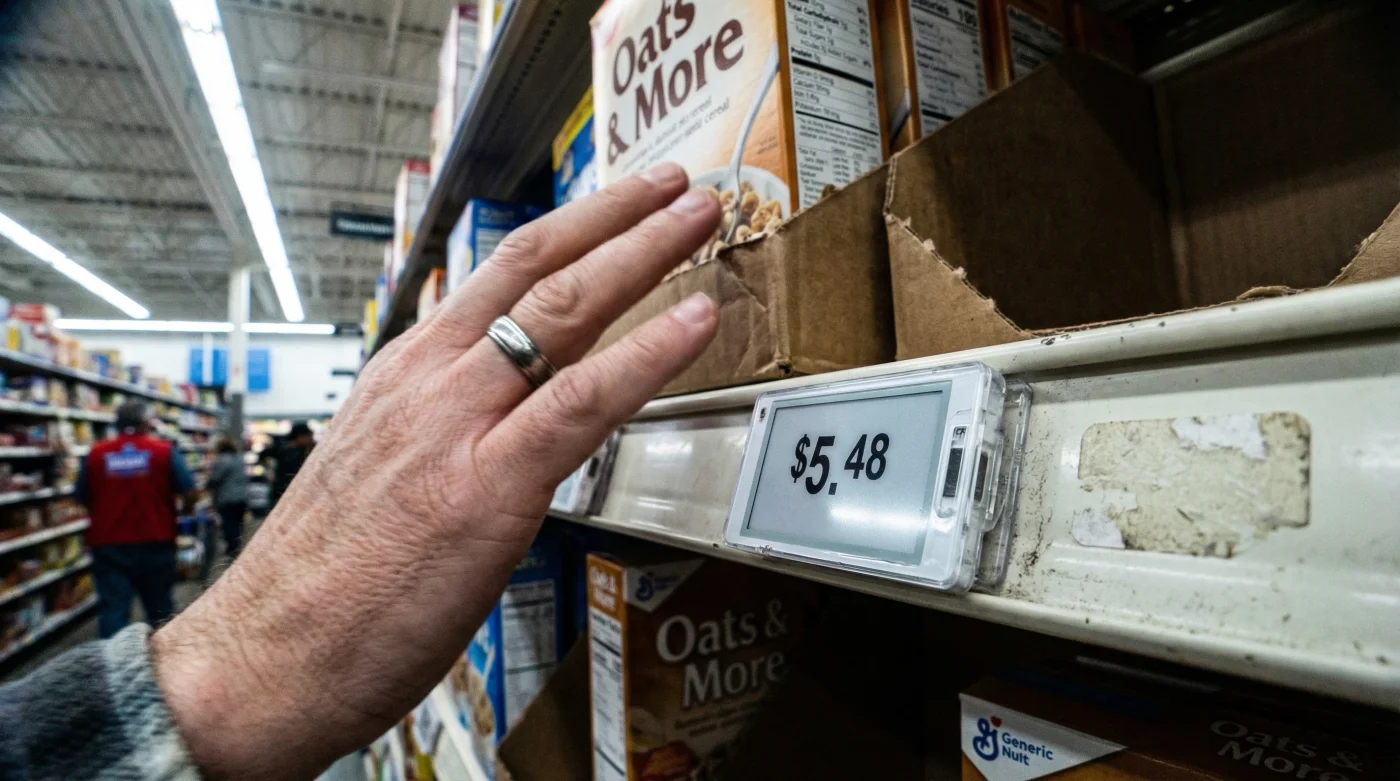
Imagine walking down the cereal aisle, reaching for your favorite box of oats, and watching the price digit flicker and rise by fifty cents right before your eyes. For decades, the grocery store was a sanctuary of static pricing, where a price tag was a promise that lasted at least a week. Today, that stability is being upended by a massive technological overhaul quietly sweeping through the nation’s largest retailer. A hidden infrastructure shift is replacing the familiar paper tags with sophisticated electronic screens, fundamentally changing the relationship between the shopper and the shelf.
This transition is not merely cosmetic; it represents one of the most significant operational shifts in modern retail history. While Walmart promotes this innovation as a victory for stocking efficiency and environmental sustainability, it has triggered a distinct psychological response among American consumers known as ‘loss aversion.’ The fear is palpable: does this technology open the door for ‘surge pricing’—the practice of hiking costs during peak hours—or is it purely a logistical evolution designed to keep shelves full? Understanding the mechanics behind these Digital Shelf Labels (DSLs) is crucial for every smart shopper navigating this new digital landscape.
The Mechanics of the Digital Shelf: How DSL Works
At its core, the Digital Shelf Label system utilizes technology similar to e-readers, known as electrophoretic display or electronic paper. Unlike bright LED screens that require constant power, these labels use minimal energy and only consume battery life when the image changes. These units are connected to a central server via low-energy wireless protocols, allowing corporate headquarters or local store managers to update tens of thousands of price tags instantly with a single keystroke. This eliminates the labor-intensive process of printing, cutting, and manually placing paper tags—a task that historically consumed thousands of associate hours per week.
The system relies on a high-fidelity integration with the store’s inventory management software. When a price is adjusted in the central database, the signal is broadcast to the specific MAC address of the shelf label. This synchronization ensures that the price on the shelf always matches the price at the register, theoretically eliminating the dreaded scanning error disputes that slow down checkout lines. Below is a breakdown of who truly benefits from this technological leap.
Table 1: The Retail Benefit Matrix (Shopper vs. Retailer)
| Feature | Benefit to Walmart (Retailer) | Benefit to You (Shopper) |
|---|---|---|
| Instant Price Updates | Reduces labor costs; enables rapid response to inflation or competitor pricing. | Price Accuracy: Reduces the frequency of being overcharged at the register due to outdated paper tags. |
| Stock-to-Light Tech | Allows associates to flash an LED on the tag to locate items for online order picking. | Faster Restocking: Empty shelves are filled faster as employees can locate product slots instantly. |
| Centralized Control | Ensures compliance across 4,700+ locations instantly. | Consistency: The price you see online is more likely to match the in-store price. |
While the operational efficiencies are clear, the sheer speed at which these changes can occur has raised valid concerns regarding consumer protections and pricing psychology.
Addressing the ‘Surge Pricing’ Anxiety
- ER doctors warn against using mandolins for viral cucumber salads
- McDonald’s launches the five dollar meal deal to lure customers
- Costco stocks silver coins as members demand more precious metals
- Chipotle denies the phone trick increases your burrito bowl portion
- Spotify confirms the Car Thing device will stop working soon
According to industry analysis, the primary driver is the ability to execute ‘Rollbacks’ and promotional pricing without the lag time of physical labor. Under the old model, a price change decision made on Monday might not be reflected on the shelf until Wednesday due to staffing limitations. With DSLs, the change is immediate. To understand the scale of this deployment, we must look at the hard data driving this investment.
Table 2: Technical Deployment Data & Capacity
| Metric | Specification / Data Point | Operational Implication |
|---|---|---|
| Target Rollout | 2,300 Stores by 2026 | Over 50% of the US footprint will be digitized within 24 months. |
| Tag Capacity | ~120,000 Tags per Store | Every SKU (Stock Keeping Unit) will have a unique digital identifier. |
| Update Latency | < 2 Minutes | Prices can be updated store-wide faster than a shopper can walk the perimeter. |
| Battery Life | 5 to 7 Years | Long-term sustainability utilizing low-power wide-area network (LPWAN) protocols. |
Despite the reassurances, the capability for dynamic pricing is technically present in the hardware, meaning the only barrier is corporate policy, not technology. This brings us to the practical application of how these labels function during your weekly shop.
Diagnostics: Identifying the Smart Shelf Environment
As a consumer, identifying whether a store is utilizing real-time pricing technology versus static displays can help you audit your receipts more effectively. The new labels are often sleek, square devices that may include a small LED light in the corner (used for the ‘Stock-to-Light’ feature). Understanding the behavior of these devices is essential for validating the price you pay.
Troubleshooting Price Discrepancies
If you suspect a pricing error or a sudden shift, look for these diagnostic signs:
- Symptom: The tag screen is flickering or inverted (black background, white text).
Cause: The tag is likely receiving a data packet update or refreshing its e-ink display. Wait 30 seconds for stabilization. - Symptom: The LED light is flashing green or blue.
Cause: An associate is likely looking for this item for an online order fulfillment; this does not indicate a price change. - Symptom: The price on the shelf does not match the app.
Cause: While DSLs reduce this, latency in the local store server can occur. Action: Always default to the App price and show it to the cashier (Walmart Price Match Policy).
To navigate this new environment, shoppers must be aware of the evolution of shelf labeling and what distinguishes a high-quality implementation from a confusing one.
Table 3: The Progression of Pricing Clarity
| Label Type | What to Look For (Pros) | What to Avoid (Cons) |
|---|---|---|
| Generation 1: Paper Tags | High contrast, static reliability. | Often missing, torn, or hidden behind products. High error rate on clearance items. |
| Generation 2: Early LCD | Digital numbers (calculator style). | Hard to read from angles (poor viewing cone), no product description, battery failures. |
| Generation 3: Walmart DSL (E-Ink) | Paper-like readability, QR codes for product info, high contrast. | Caution: Check unit of measurement (per oz/per lb) as digital layouts may shift this data to smaller fonts. |
The shift to digital shelf labels is inevitable across the retail sector. While it promises a streamlined, eco-friendly future with less paper waste and higher accuracy, it places a new responsibility on the consumer to stay vigilant. The technology allows for real-time changes, so the habit of checking your receipt against the shelf price is more vital than ever.